
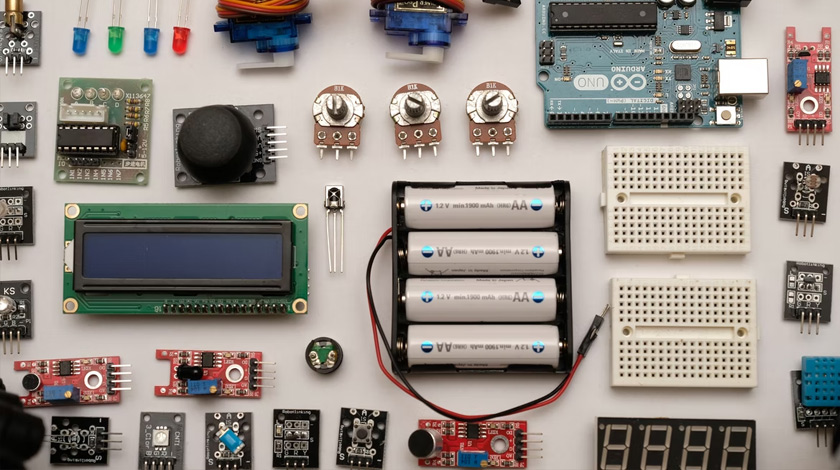
The Internet of Things connects sensors, appliances and machines to networks so they can report data or be controlled remotely. Whether you are building a home temperature sensor, a fleet tracker or an industrial monitor, the same layers appear in every project: the device, the connection, the platform that collects the data and the application that uses it. Choosing well at each layer decides how much the project costs to build and to run for years afterwards. This overview lists the main options in every layer, the trade-offs between them and the security basics that are too often forgotten.
1. Hardware
- ESP32 and ESP8266: inexpensive microcontrollers with Wi-Fi and, on the ESP32, Bluetooth. Popular for prototypes and consumer products because they are cheap, well documented and supported by a large community.
- Arduino: approachable boards with a huge library ecosystem and the easiest way to learn the basics of sensors and actuators.
- Raspberry Pi: a small Linux computer that suits gateways, cameras, dashboards and any project that needs local processing or a full operating system.
- STM32 and Nordic nRF: professional microcontrollers focused on low power, long battery life and Bluetooth Low Energy.
Pick the simplest board that meets your power, connectivity and security needs. A battery sensor that must run for a year on a coin cell needs a very different chip from a mains-powered camera.
2. Operating systems and firmware
- FreeRTOS and Zephyr: real-time operating systems for constrained devices that need predictable timing and small memory use.
- PlatformIO: a build system and editor extension that supports many boards and libraries from one project format.
- Over-the-air (OTA) updates: essential for fixing security problems after deployment. Plan them before the first device ships; adding them later is painful.
3. Connectivity
| Technology | Range | Typical use |
|---|---|---|
| Wi-Fi | Tens of metres | Homes and offices with mains power |
| Bluetooth LE | Short | Wearables, tags, setup of devices |
| Zigbee, Thread / Matter | Mesh across a building | Smart-home devices that relay for each other |
| LoRaWAN | Kilometres, very low data rate | Agriculture, utilities and city sensors |
| NB-IoT, LTE-M, 5G | Mobile networks | Trackers, meters, vehicles, remote equipment |
- Technology: Wi-Fi
- Range
- Tens of metres
- Typical use
- Homes and offices with mains power
- Technology: Bluetooth LE
- Range
- Short
- Typical use
- Wearables, tags, setup of devices
- Technology: Zigbee, Thread / Matter
- Range
- Mesh across a building
- Typical use
- Smart-home devices that relay for each other
- Technology: LoRaWAN
- Range
- Kilometres, very low data rate
- Typical use
- Agriculture, utilities and city sensors
- Technology: NB-IoT, LTE-M, 5G
- Range
- Mobile networks
- Typical use
- Trackers, meters, vehicles, remote equipment
For cellular devices, eSIM and 5G make large roll-outs simpler: see eSIM explained and 5G and GSM networks.
4. Protocols
- MQTT: lightweight publish/subscribe messaging, the de facto standard for telemetry. A broker receives messages and forwards them to subscribers.
- CoAP: a lightweight alternative designed for constrained devices, similar to HTTP but built on UDP.
- HTTP and WebSockets: simplest when bandwidth and power are not tight and developers already know the web stack.
5. Platforms and tools
- Cloud platforms: AWS IoT Core and Azure IoT Hub provide device registries, messaging and rules engines. Google Cloud IoT Core was retired in 2023, so teams that used it moved to partners or open-source alternatives.
- Open source: ThingsBoard for dashboards and device management, Node-RED for visual flows, Grafana for monitoring and Eclipse Mosquitto as a simple MQTT broker.
- Databases: time-series databases such as InfluxDB or TimescaleDB store sensor readings efficiently.
6. Security basics
- Give every device a unique identity and credentials; never ship a default password.
- Encrypt traffic with TLS and check certificates on the device.
- Plan secure OTA updates from the start and sign firmware.
- Collect only the data you need and document where it goes.
- Turn off debug interfaces and unused services before production.
A first project in a weekend
A good first project is a temperature and humidity sensor. Use an ESP32 board with a sensor module, publish readings over MQTT to a free broker or your own Raspberry Pi and show them in Grafana or Node-RED. In one weekend you touch every layer: hardware, firmware, protocol, platform and dashboard. Once it works, add OTA updates and TLS to learn the security basics on a small scale.
Common mistakes
- Choosing Wi-Fi for a battery-powered device that will sleep most of the time.
- Ignoring the cost of mobile data and SIM management at scale.
- Forgetting that the cloud bill grows with the number of messages.
- Leaving devices without any way to update them.
IoT devices often use the same real-time technologies as your browser: WebRTC can stream a camera to a web page directly, and the same ideas power P2P chat in the browser.
Choosing a connection: questions to ask
- Is there mains power? If yes, Wi-Fi or Ethernet is simplest. If the device runs on a battery for months, look at BLE, LoRaWAN or NB-IoT.
- How far must the signal travel? Across a room: Bluetooth. Across a farm or a city: LoRaWAN or cellular.
- How much data per message and how often? A few bytes every hour suits LoRaWAN; video suits Wi-Fi or 5G.
- Who owns the network? A cellular network needs SIMs and a data plan; LoRaWAN can run on your own gateway.
- Does the device move? A tracker needs cellular coverage; a fixed sensor does not.
Power budget: making a battery last
Most of the time a battery sensor should be asleep. A typical cycle is: wake up, read the sensor, send a short message and go back to deep sleep. The radio is the largest consumer, so sending less often, sending fewer bytes and using low-power protocols extend the battery life far more than clever code. Measure the real current consumption with a power profiler instead of trusting the datasheet, and test at low temperatures, where batteries lose capacity.
Data and cost model
Before you scale, estimate the monthly cost per device: connectivity (SIM or gateway share), cloud messages, storage and support. A device that sends one message a minute produces about 43,000 messages a month, and many cloud platforms charge per message. Sending data in batches, compressing payloads and processing at the edge can cut the bill significantly.
Edge or cloud processing?
| Edge (on the device or gateway) | Cloud | |
|---|---|---|
| Response time | Milliseconds | Depends on the network |
| Bandwidth | Sends only results | Sends raw data |
| Updating logic | Needs firmware updates | Easy to change |
| Works offline | Yes | No |
- Response time
- Edge (on the device or gateway)
- Milliseconds
- Cloud
- Depends on the network
- Bandwidth
- Edge (on the device or gateway)
- Sends only results
- Cloud
- Sends raw data
- Updating logic
- Edge (on the device or gateway)
- Needs firmware updates
- Cloud
- Easy to change
- Works offline
- Edge (on the device or gateway)
- Yes
- Cloud
- No
Provisioning and device management
- Give each device a unique certificate or key stored in a secure element, not in plain flash memory.
- Automate provisioning at the factory or on first connection so that nobody types keys by hand.
- Track device versions and health in a registry so that you know which devices need updates.
- Plan for revoking a device if it is lost or compromised.
Testing and monitoring
Simulate thousands of devices with scripts before launch to find bottlenecks in the broker and the database. In production, log connection failures, battery levels and firmware versions; most field problems appear first as unusual battery drain or reconnect loops. Alerting on "devices that stopped reporting" is more useful than alerting on single errors.
Regulation and standards
Connected products are regulated. In Europe, radio devices must meet the Radio Equipment Directive and carry the CE mark, and new EU rules on cyber security for connected products are being phased in. In the United States, radio devices need FCC approval. Check requirements early because certification can take weeks and costs money.
Three example architectures
- Home climate sensor: ESP32 with a temperature sensor, Wi-Fi, MQTT to a Raspberry Pi running Mosquitto and Grafana.
- Farm soil monitor: battery sensor, LoRaWAN to a gateway, a network server and a dashboard.
- Vehicle tracker: GPS module and an LTE-M modem with an eSIM, sending position every minute to a cloud platform.
Glossary
- Broker
- A server that receives MQTT messages and delivers them to subscribers.
- Gateway
- A device that connects local sensors (BLE, LoRa, Zigbee) to the internet.
- OTA
- Over-the-air firmware update.
- Deep sleep
- A mode in which the microcontroller uses almost no power between measurements.
Where to learn more
- Start with the documentation of the board you choose; ESP32 and Raspberry Pi have large communities and many tutorials.
- Read the MQTT specification summary: it is short and explains quality-of-service levels.
- Try a free tier of a cloud platform with a few simulated devices before you buy hardware in volume.
- Follow security advisories for the libraries you use, because a vulnerable open-source component in thousands of devices is hard to fix later.
Frequently asked questions
Which board should a beginner buy?
An ESP32 development board is cheap, has Wi-Fi and Bluetooth and works with the Arduino tools, so it is a good first purchase.
Do I need a cloud platform?
Not at first. A small MQTT broker on a Raspberry Pi is enough to learn; move to a managed platform when you need many devices or remote access.
Is IoT secure by default?
No. Security has to be designed in: unique credentials, encrypted connections, signed updates and a way to revoke devices.
 eSIM Explained: Flexibility and Savings for Travellers and Everyday Users
 OnePlus 8 Revisited: Specs, Strengths and Whether It Is Still Worth Using
 How to Turn On RCS Chats in Google Messages (Android)
 5G and GSM Networks: What Changes for Calls, Texts and Data